What Is Good FPS for Gaming? For most players, 60 FPS is a good starting point for smooth gaming, while 120 FPS, 144 FPS, and higher can provide noticeably smoother motion and quicker visual feedback. The ideal FPS depends on the game, your monitor’s refresh rate, your hardware, and how competitive you are.
Frames per second, commonly called FPS, tells you how many individual frames your PC or console displays every second. A higher FPS generally makes movement look smoother, but more FPS is not always necessary for every game.
Table of Contents
What Is FPS in Gaming?
FPS stands for frames per second. It measures how many images your gaming system renders and displays each second.
For example, at 30 FPS, a game displays about 30 frames every second. At 60 FPS, it displays about twice as many. Higher frame rates can make camera movement, character animation, and fast action appear smoother.
Think of a game as a rapidly changing series of pictures. The more pictures shown each second, the smoother the movement can look.
So, What Is Good FPS for Gaming?
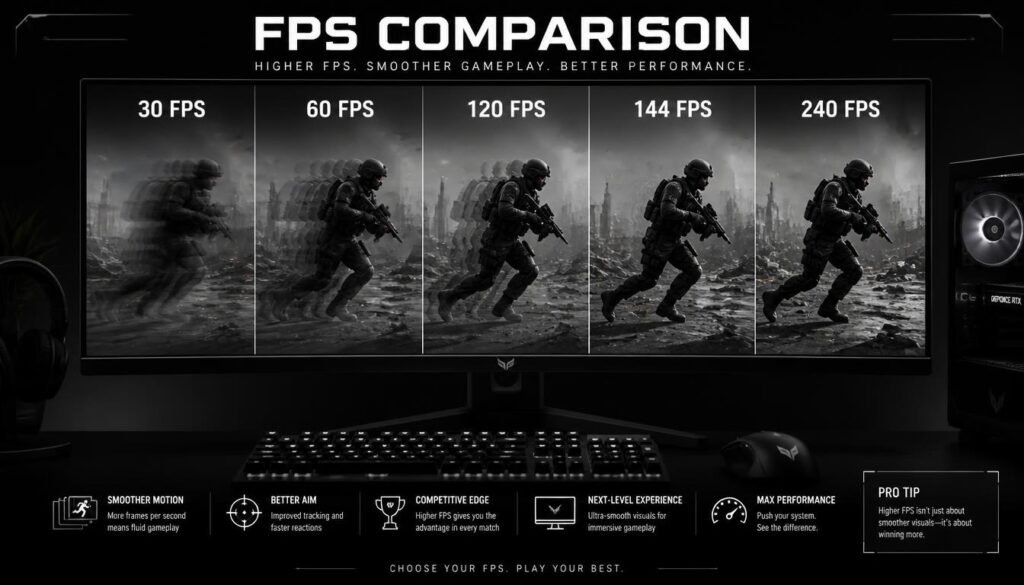
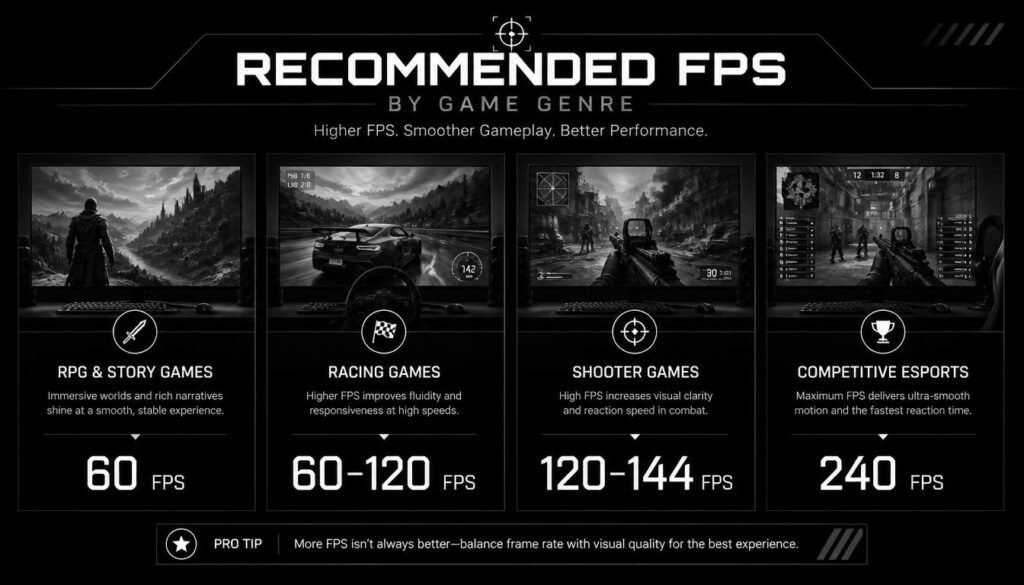
A good FPS for gaming depends on the type of game and your display, but these ranges are useful:
| FPS | Gaming Experience | Best For |
|---|---|---|
| 30 FPS | Playable but less smooth | Slower games, some console titles |
| 60 FPS | Smooth and comfortable | Most games and casual gaming |
| 90 FPS | Very smooth | General gaming and higher-refresh displays |
| 120 FPS | Excellent | Fast-paced games and competitive play |
| 144 FPS | Very smooth | Competitive PC gaming |
| 165 FPS | Excellent | High-refresh gaming monitors |
| 240 FPS | Extremely smooth | Competitive esports |
| 360+ FPS | Specialized | High-level competitive gaming |
For many gamers, 60 FPS is good, 120–144 FPS is excellent, and 240 FPS or higher is mainly useful for competitive gaming.
The best target is not simply the highest number your computer can produce. It is a frame rate that your hardware can maintain consistently and that matches your monitor.
Is 60 FPS Good for Gaming?
Yes, 60 FPS is good for gaming for most players.
At 60 FPS, games can look smooth enough for single-player adventures, RPGs, strategy games, racing games, and many multiplayer titles. It is also a common target because it offers a good balance between visual smoothness and hardware requirements.
However, 60 FPS may feel less responsive than 120 FPS or 144 FPS, especially in games with rapid camera movement.
For example, turning your character quickly in a first-person shooter can look noticeably smoother at 144 FPS than at 60 FPS when the rest of the system is capable of supporting that higher frame rate.
Is 120 FPS Good for Gaming?
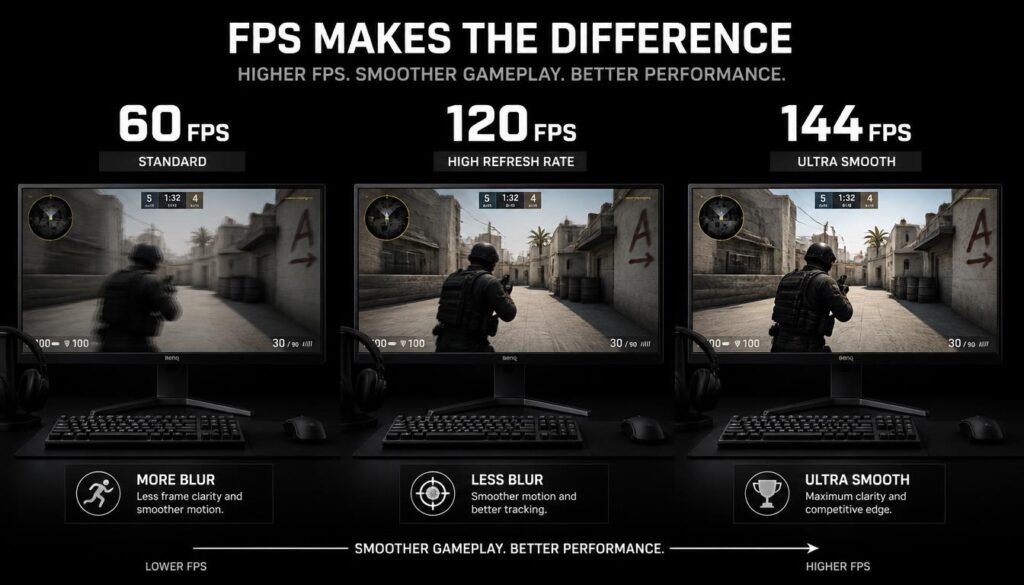
120 FPS is an excellent frame rate for gaming. It provides noticeably smoother motion than 60 FPS and can make fast-paced games feel more responsive.
It is particularly useful in:
- First-person shooters
- Racing games
- Fighting games
- Sports games
- Competitive multiplayer games
A 120 Hz or higher monitor is needed to properly display the benefits of a 120 FPS output.
If your gaming PC can consistently stay around 120 FPS, you can get a very smooth experience without needing the extreme hardware requirements of very high frame rates.
Is 144 FPS Good for Gaming?
Yes. 144 FPS is considered an excellent target for PC gaming, especially for competitive titles.
A 144 FPS game running on a 144 Hz monitor can provide very smooth motion and responsive visual feedback. This is one reason 144 Hz gaming monitors have become popular among PC gamers.
For esports and competitive shooters, 144 FPS can be a strong balance between performance and hardware demands.
You do not necessarily need 144 FPS for every game, though. A slower-paced game may look and feel perfectly good at 60 FPS.
Is 240 FPS Worth It?
240 FPS can be worthwhile for competitive gamers, but it is not necessary for most players.
The difference between 60 FPS and 120 or 144 FPS is generally easier to notice than the difference between 144 FPS and 240 FPS.
At 240 FPS, your system is producing a new frame roughly every 4.17 milliseconds. At 144 FPS, the interval is about 6.94 milliseconds.
That can benefit players who prioritize responsiveness, particularly in fast esports games. However, achieving 240 FPS often requires stronger hardware, and your monitor also needs an appropriately high refresh rate.
For ordinary gaming, spending more money to reach 240 FPS may provide less value than improving other parts of your gaming setup.
What FPS Is Best for Different Types of Games?
There is no single best FPS for every game.
Story and Single-Player Games
For games focused on exploration, storytelling, RPG mechanics, or cinematic visuals, 60 FPS is often enough.
A stable frame rate can matter more than chasing extremely high numbers. For these games, graphics quality and resolution may be higher priorities.
First-Person Shooters
For shooters such as competitive FPS games, 120 FPS to 240 FPS can be a strong target.
Higher frame rates can make fast camera movements appear smoother and may provide more frequent visual updates.
Competitive players often prefer higher refresh-rate displays and higher FPS when their hardware can support them.
Racing Games
60 FPS is a good baseline for racing games, while 120 FPS or higher can make fast motion feel smoother.
Higher frame rates can be especially enjoyable when quickly turning corners or driving through detailed environments.
Strategy and Simulation Games
Strategy and simulation games usually do not require extremely high FPS.
60 FPS is often more than enough, although the ideal target depends on the individual game and how complex the scene becomes.
Fighting Games
For fighting games, consistency is extremely important. Depending on the game, 60 FPS is often the standard target, because timing and animation behavior can be closely tied to the game’s design.
FPS vs Refresh Rate: What’s the Difference?
FPS and refresh rate are related, but they are not the same thing.
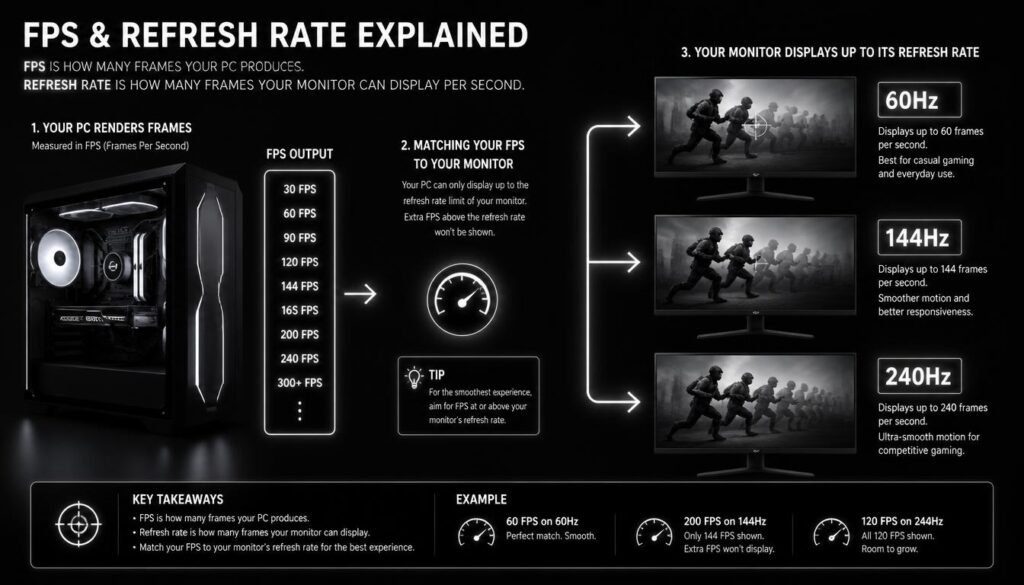
FPS is how many frames your computer or console generates per second.
Refresh rate, measured in hertz (Hz), is how many times your monitor can refresh the image each second.
For example:
- A game running at 60 FPS produces about 60 frames per second.
- A 60 Hz monitor can refresh up to 60 times per second.
- A game running at 144 FPS can produce 144 frames per second.
- A 144 Hz monitor can refresh up to 144 times per second.
Ideally, your FPS and monitor refresh rate should be suited to each other.
A 240 FPS game cannot make a 60 Hz monitor display 240 unique refreshes per second. The monitor’s refresh rate limits how frequently it can update what you see.
Does Higher FPS Always Mean Better Gaming?
No. Higher FPS is generally beneficial, but it does not automatically make a game better.
There are several reasons.
First, your monitor needs a high enough refresh rate to take advantage of higher FPS.
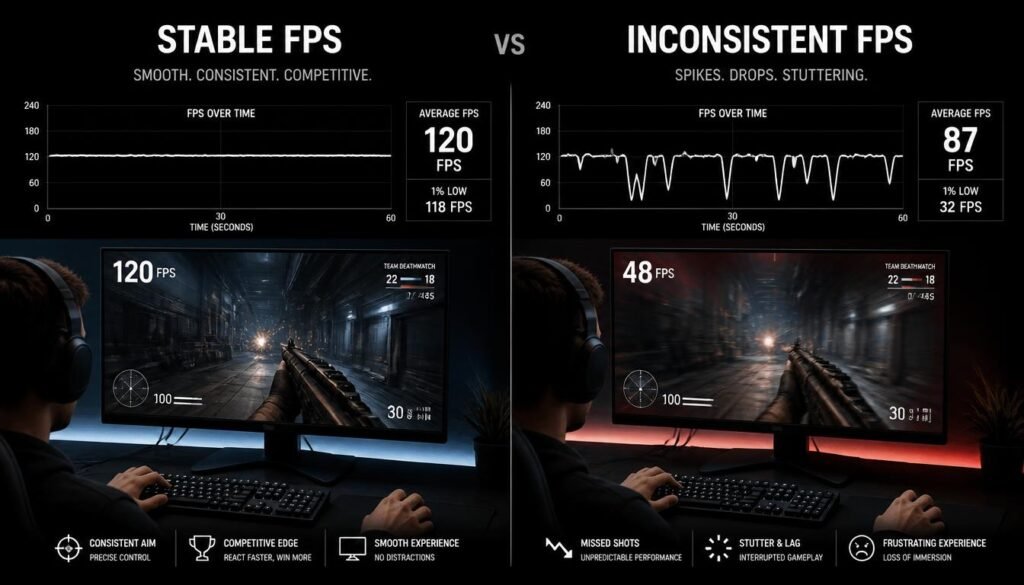
Second, your PC must be powerful enough to maintain that frame rate. If the FPS constantly jumps between 80, 150, and 100, the experience may feel less consistent than a stable frame rate.
Third, different games have different performance needs. A story-driven game may gain little practical value from extremely high FPS compared with a competitive shooter.
This is why consistent FPS is often more useful than chasing the highest possible number.
What Is a Good FPS for a 60 Hz Monitor?
For a 60 Hz monitor, 60 FPS is a sensible target.
Your display refreshes 60 times per second, so pushing a game far above 60 FPS does not provide the same visible benefit as using a high-refresh-rate monitor.
A higher FPS output can still affect aspects of responsiveness depending on the setup, but the monitor itself can only refresh at its rated frequency.
If you’re using a 60 Hz display and want a noticeably smoother experience, upgrading to a higher-refresh-rate monitor can make a larger difference than simply trying to increase FPS.
What Is a Good FPS for a 144 Hz Monitor?
For a 144 Hz monitor, around 144 FPS is an excellent target.
You can still enjoy the monitor when your game runs below 144 FPS, but higher and more consistent FPS lets you take greater advantage of the display’s refresh capability.
For example, if your game stays around 120 FPS, it can still feel very smooth on a 144 Hz monitor. If it consistently reaches close to 144 FPS, you are making better use of the panel’s refresh rate.
What Is a Good FPS for a 240 Hz Monitor?
With a 240 Hz monitor, 240 FPS is the ideal maximum target when your hardware and game can consistently reach it.
However, you do not need exactly 240 FPS to enjoy a 240 Hz display.
A game running at 180 or 200 FPS can still look and feel very smooth. The benefit of a 240 Hz monitor becomes more relevant for gamers who play fast competitive titles and care about minimizing latency and maximizing responsiveness.
Why Does FPS Drop During Gaming?
Even a powerful gaming PC can experience FPS drops.
Common causes include:
Graphics Settings
Higher settings such as shadows, reflections, texture quality, volumetric effects, and ray tracing can increase the workload on your GPU.
Lowering demanding settings can improve FPS.
Resolution
Higher resolutions require your graphics hardware to render more pixels.
For example, moving from 1080p to 1440p or 4K can significantly increase the rendering workload.
CPU Limitations
Some games rely heavily on the CPU, especially when there are many characters, physics calculations, or background processes.
In these cases, lowering graphics settings may not dramatically increase FPS because the CPU is already limiting performance.
Background Applications
Web browsers, recording software, game launchers, and other applications can consume system resources.
Closing unnecessary programs can sometimes improve consistency.
Thermal Throttling
When a CPU or GPU gets too hot, it may reduce its clock speed to control temperatures. This can lead to lower gaming performance.
Good airflow and proper cooling can help prevent this.
How to Get Better FPS in Games
If your FPS is lower than you want, try these practical steps:
- Lower demanding graphics settings. Start with shadows, reflections, volumetric effects, and ray tracing.
- Reduce resolution when necessary. Moving to a lower resolution can significantly reduce GPU workload.
- Update your graphics drivers. New driver releases can include game-specific fixes and performance improvements.
- Close unnecessary background programs. This can free CPU and memory resources.
- Check temperatures. Excessive heat can cause performance reductions.
- Use appropriate game settings. Many games include performance-focused presets.
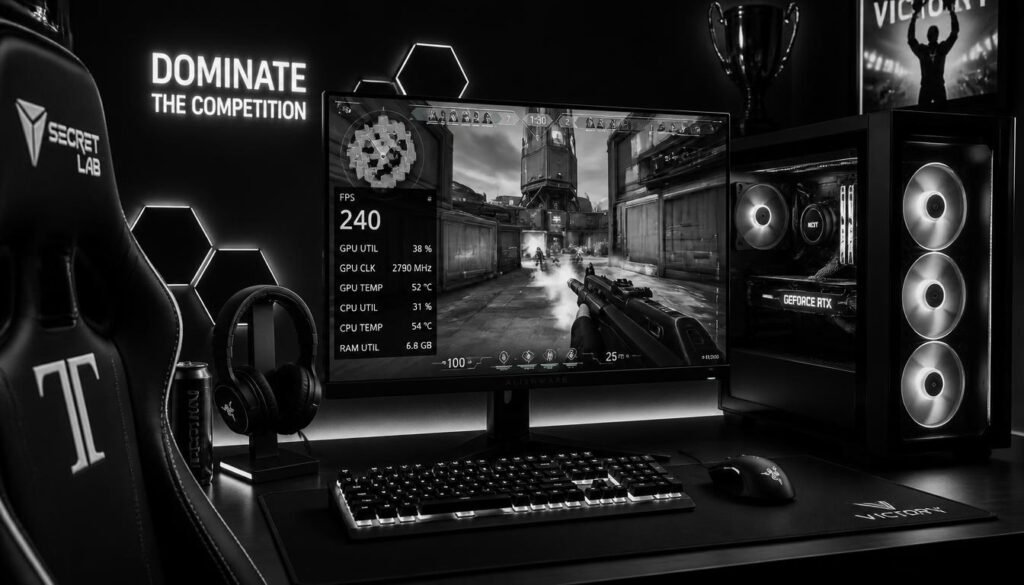
- Check your CPU and GPU usage. This can help identify whether the processor or graphics card is the main limitation.
Do not assume that lowering every setting is the best solution. Some settings have a large visual impact while providing only a small FPS improvement.
Stable FPS vs Higher Average FPS
A stable frame rate can feel better than a higher but inconsistent average.
Imagine two systems:
- System A averages 120 FPS but frequently drops to 70 FPS.
- System B stays close to 100 FPS with fewer major drops.
System B may feel smoother because its frame delivery is more consistent.
This is why monitoring frame-time consistency and sudden drops can be useful when evaluating gaming performance.
What Is 1% Low FPS?
1% low FPS is a performance metric that shows how the game behaves during some of its slower moments.
Instead of only looking at average FPS, 1% low FPS helps reveal dips that can cause noticeable stuttering or uneven gameplay.
For example, a game might average 120 FPS but have much lower 1% lows. Looking at both numbers gives you a better understanding of the overall experience.
For gamers troubleshooting stutters, average FPS alone may not tell the full story.
Does FPS Affect Input Lag?
Yes. Higher FPS can reduce the time between rendered frames, which can contribute to a more responsive experience.
At 60 FPS, a new frame is generated about every 16.67 milliseconds.
At 120 FPS, that drops to about 8.33 milliseconds.
At 144 FPS, it is about 6.94 milliseconds.
At 240 FPS, it is about 4.17 milliseconds.
These numbers describe frame intervals, not total system input latency. Actual input lag also depends on your mouse or controller, CPU and GPU workload, game engine, display, connection, and other parts of the system.
What FPS Should You Aim For?
For most gamers, these are practical targets:
Casual gaming: Aim for around 60 FPS.
Smooth general PC gaming: Aim for 90–120 FPS when your hardware and monitor support it.
Competitive gaming: Aim for 144 FPS or higher when practical.
High-level esports: 240 FPS or more can make sense when paired with a high-refresh-rate monitor and hardware capable of maintaining it.
The right choice depends on your priorities and budget. You do not need a 240 FPS setup to enjoy modern games.
Common FPS Mistakes Gamers Make
One common mistake is assuming that higher FPS automatically means a better experience.
Another is buying a high-refresh-rate monitor without having hardware capable of producing enough frames to use it effectively.
Some gamers also focus only on average FPS. A high average number does not always mean the game feels smooth if there are frequent stutters or frame-time spikes.
Finally, players sometimes lower graphics quality too much just to reach a very high FPS number, even when the extra frames are barely noticeable on their display.
Frequently Asked Questions About Good FPS for Gaming
Is 30 FPS good for gaming?
30 FPS is playable and can be acceptable for some games, especially slower-paced or console titles. However, 60 FPS generally provides noticeably smoother motion.
Is 60 FPS enough for gaming?
Yes. 60 FPS is enough for many gamers and is a good target for most single-player, strategy, RPG, and casual gaming experiences.
Is 90 FPS good for gaming?
Yes. 90 FPS provides smoother motion than 60 FPS and can be a great target for players using higher-refresh-rate displays.
Is 120 FPS better than 60 FPS?
Generally, yes. 120 FPS provides smoother motion and shorter frame intervals than 60 FPS, which can make fast-paced games feel more responsive.
Is 144 FPS better than 120 FPS?
144 FPS can provide a small improvement over 120 FPS, but the difference is less dramatic than moving from 60 FPS to 120 FPS. A 144 Hz monitor can make good use of the higher frame rate.
Do I need 240 FPS for competitive gaming?
No. You do not need 240 FPS to play competitively. 144 FPS can already provide an excellent experience, while 240 FPS is mainly useful for players who want very high refresh rates and have hardware capable of maintaining them.
Is higher FPS better than higher graphics quality?
It depends on the game and the player. Competitive players may prefer higher FPS and responsiveness, while players focused on visual quality may prefer higher resolution and graphics settings.
Can my monitor display more FPS than its refresh rate?
A monitor cannot physically refresh more times per second than its rated refresh rate. For example, a 60 Hz display cannot refresh 144 times per second.
Conclusion
So, what is good FPS for gaming? For most players, 60 FPS is a solid baseline, 120–144 FPS is excellent for smoother gaming, and 240 FPS or higher is mainly useful for competitive players with high-refresh-rate monitors.
The best FPS target depends on your game, monitor, PC hardware, and personal preferences. Instead of chasing the biggest number, focus on achieving a smooth, stable frame rate that matches your display.
For many gamers, a consistent 60 FPS is already enjoyable. For competitive PC gaming, moving to 120 FPS, 144 FPS, or higher can provide a smoother and more responsive experience.