
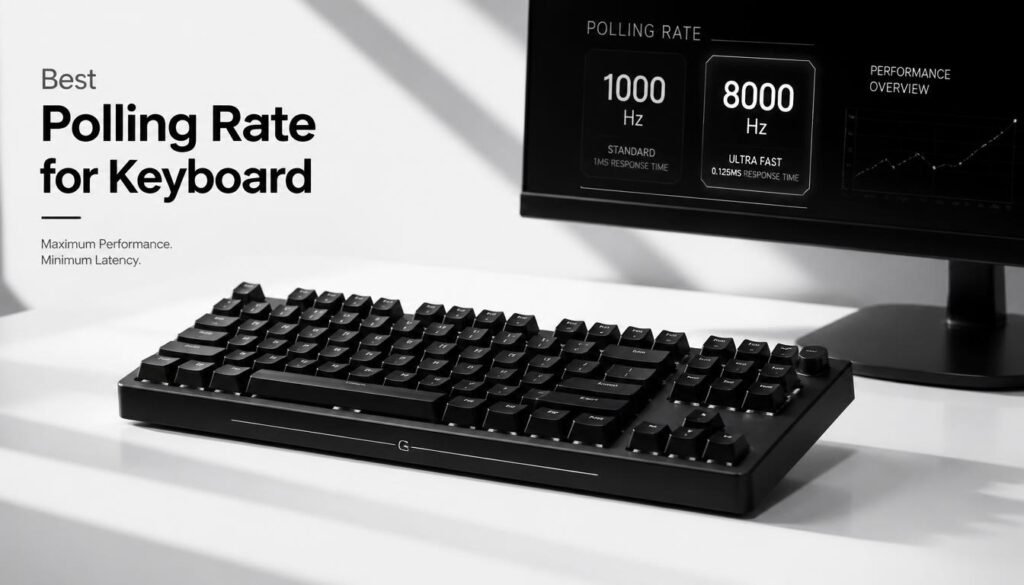
The best polling rate for keyboard depends on how you use your keyboard, but for most people, 1000Hz is the best overall choice. It gives a 1 ms polling interval, works well for gaming and everyday use, and avoids chasing extremely small latency improvements that many users will not notice.
Higher options such as 2000Hz, 4000Hz, and 8000Hz are available on newer gaming keyboards. They can reduce the theoretical time between USB reports, but polling rate is only one part of overall keyboard input latency. Your switches, scan rate, firmware, game, PC, and monitor can also affect how quickly an input is registered.
This guide explains what keyboard polling rate means, how 125Hz, 500Hz, 1000Hz, and 8000Hz compare, and which setting makes the most sense for gaming, typing, and competitive play.
Table of Contents
What Is the Best Polling Rate for Keyboard?
For most users, 1000Hz is the best polling rate for a keyboard. A 1000Hz polling rate means the keyboard can report its state to the computer up to 1,000 times per second, corresponding to a theoretical 1 ms polling interval.
Here is a simple comparison:
| Polling Rate | Theoretical Interval | Best For |
|---|---|---|
| 125Hz | 8 ms | Basic office use |
| 500Hz | 2 ms | Casual gaming and general use |
| 1000Hz | 1 ms | Most gaming and everyday use |
| 2000Hz | 0.5 ms | High-end gaming |
| 4000Hz | 0.25 ms | Enthusiast and competitive gaming |
| 8000Hz | 0.125 ms | High-end competitive setups |
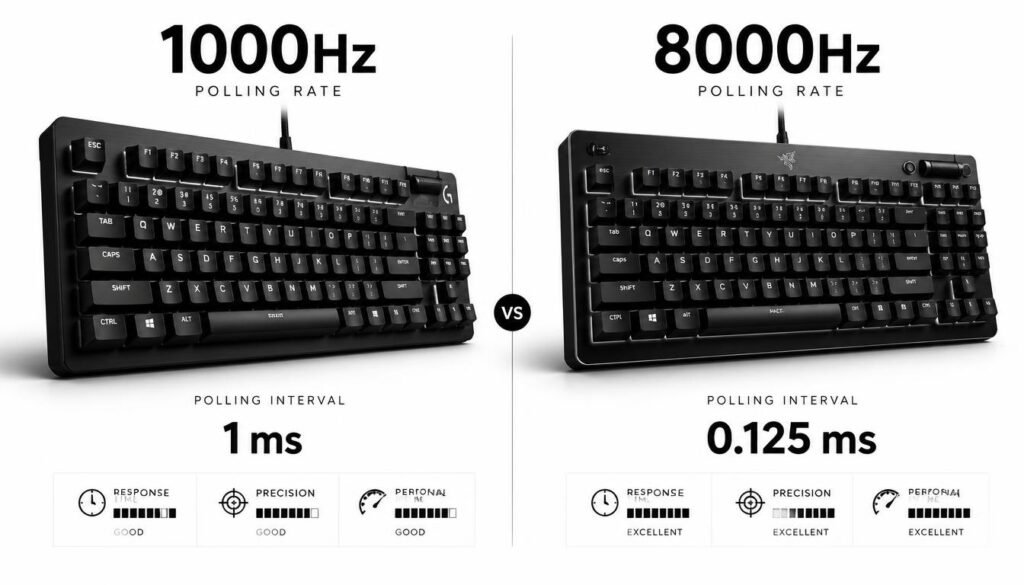
The difference between 1000Hz and 8000Hz looks large on a specification sheet, but the theoretical polling interval only changes by 0.875 ms. That is why 8000Hz is not automatically better for every user.
What Does Keyboard Polling Rate Mean?
Keyboard polling rate is the frequency at which a keyboard reports input information to the computer. It is measured in Hertz (Hz).
For example, a keyboard running at:
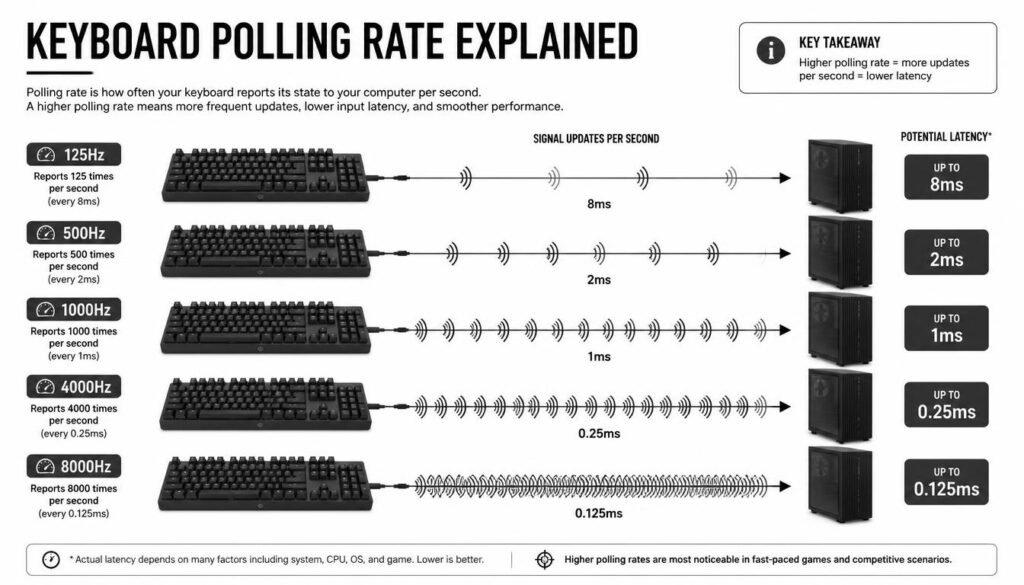
- 125Hz reports approximately every 8 ms.
- 500Hz reports approximately every 2 ms.
- 1000Hz reports approximately every 1 ms.
- 8000Hz reports approximately every 0.125 ms.
The basic relationship is:
Polling interval = 1000 ÷ polling rate
So:
1000 ÷ 1000Hz = 1 ms
and
1000 ÷ 8000Hz = 0.125 ms
A higher polling rate can reduce the maximum waiting time between reports, but it does not mean the complete keyboard-to-screen input process takes exactly that amount of time.
Is 1000Hz the Best Keyboard Polling Rate for Gaming?
Yes. 1000Hz is the best keyboard polling rate for the majority of gamers.
A 1 ms polling interval is already fast enough for most gaming situations, especially when combined with a good switch, low-latency firmware, and a responsive gaming monitor.
For games such as competitive shooters, the practical benefits of moving from 1000Hz to 8000Hz are much smaller than the numbers may suggest. Other parts of the input pipeline can contribute more latency than the polling-rate difference alone.
That does not make 8000Hz useless. It simply means it should be viewed as a high-end feature rather than a requirement for good gaming performance.
1000Hz vs 8000Hz Keyboard: Which Is Better?
The main difference is how frequently the keyboard can send reports to the PC.
1000Hz Keyboard
A 1000Hz keyboard has a theoretical polling interval of 1 ms.
It is a strong choice for:
- Competitive gaming
- FPS games
- Everyday desktop use
- Fast typing
- General mechanical keyboards
- Users who want low latency without extra complexity
For most systems, this is the sensible balance between responsiveness and hardware requirements.
8000Hz Keyboard
An 8000Hz keyboard has a theoretical polling interval of 0.125 ms.
It can make sense when you are building a high-end competitive setup and want to minimize every possible source of input delay. Some modern gaming keyboards support true 8000Hz polling, including models such as the Razer Huntsman V3 Pro 8KHz.
However, the improvement over 1000Hz is only a fraction of a millisecond at the polling interval level. The rest of your system still matters.
Does a Higher Polling Rate Make a Keyboard Faster?
A higher polling rate can reduce polling-related delay, but it does not automatically make the entire keyboard faster.
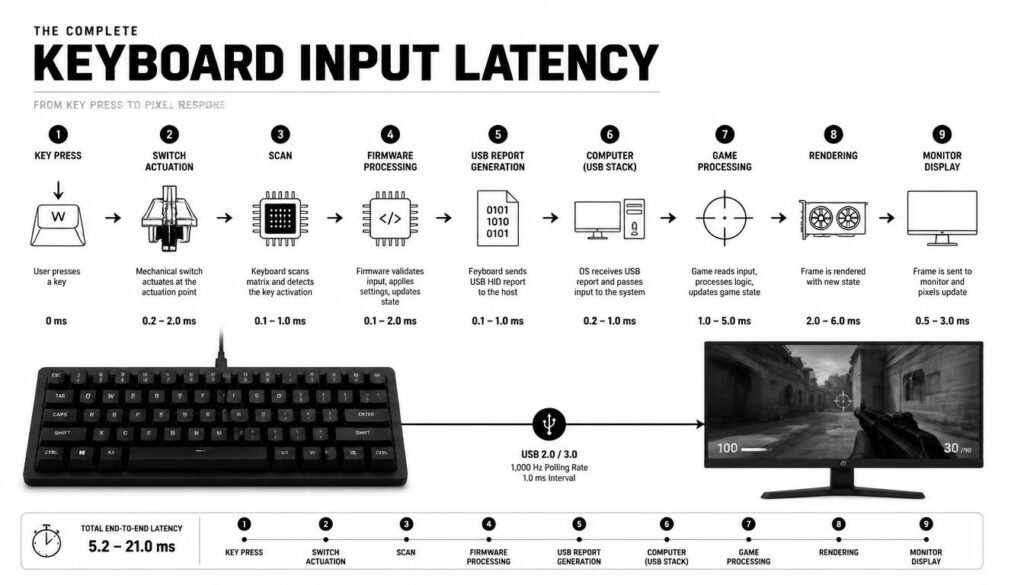
Think of polling rate as one step in a chain:
Key press → switch actuation → keyboard scan → firmware processing → USB report → operating system → game → frame rendered → monitor
If another step in that chain is slower, increasing polling rate alone cannot eliminate that delay.
This is why keyboard specifications such as scan rate, switch technology, actuation settings, firmware behavior, and overall latency should be considered together. Polling rate and scan rate are related but are not the same thing.
What Polling Rate Should You Use for Competitive Gaming?
For most competitive gamers, 1000Hz is the recommended starting point.
If your keyboard supports 2000Hz, 4000Hz, or 8000Hz and your computer and games behave properly at those settings, you can experiment with them. But do not assume the highest number will automatically improve your performance.
For a competitive setup, consistency can be more valuable than a specification advantage. A reliable keyboard that registers inputs consistently is more useful than one running at a higher polling rate but introducing compatibility problems, instability, or unnecessary system load.
Some high-end keyboards now specifically advertise 8000Hz polling for competitive gaming, showing that the technology is becoming more common in premium models.
Is 8000Hz Worth It for Gaming?
For most gamers, 8000Hz is optional rather than necessary.
The theoretical polling interval falls from 1 ms at 1000Hz to 0.125 ms at 8000Hz. That is a genuine technical difference, but it does not mean you will automatically see a dramatic improvement in gameplay.
An 8000Hz keyboard makes more sense when:
- You already have a high-performance gaming PC.
- You use a high-refresh-rate monitor.
- You play competitive games seriously.
- Your keyboard supports reliable high-polling operation.
- You care about minimizing latency as much as possible.
For casual gaming, productivity, and normal typing, 1000Hz is generally more than enough.
What Is the Best Polling Rate for Typing?
For normal typing, 500Hz or 1000Hz is more than sufficient.
Typing does not normally require the extreme polling rates marketed toward competitive gamers. If you are choosing a keyboard mainly for writing, programming, schoolwork, or office tasks, factors such as switch feel, key layout, ergonomics, noise, and build quality are usually more important than moving from 1000Hz to 8000Hz.
A fast polling rate is useful, but it should not be the main feature you use to choose a keyboard for productivity.
Does Polling Rate Affect FPS?
A higher keyboard polling rate does not directly increase your game’s graphics frame rate.
Polling rate concerns how frequently keyboard input can be reported. FPS is determined by the game’s rendering workload and hardware, including your CPU, GPU, settings, and display configuration.
Very high polling rates can also create additional processing activity because the PC receives input reports more frequently. The exact impact depends on the hardware, software, drivers, and keyboard implementation.
If your goal is higher FPS, changing the keyboard polling rate is not a substitute for optimizing graphics settings or upgrading your gaming hardware.
125Hz vs 500Hz vs 1000Hz vs 8000Hz
The easiest way to understand the differences is to compare their theoretical intervals.
125Hz
125Hz = 8 ms
This is a basic polling rate and can be perfectly adequate for ordinary office work and simple keyboard use.
500Hz
500Hz = 2 ms
This offers a lower polling interval and is suitable for casual gaming and general use.
1000Hz
1000Hz = 1 ms
This is the practical sweet spot for most gaming keyboards. It provides low polling latency without requiring an extreme polling setting.
8000Hz
8000Hz = 0.125 ms
This is designed for users who want extremely high polling frequency and have hardware that can take advantage of it.
The jump from 125Hz to 1000Hz is much larger in practical polling interval than the jump from 1000Hz to 8000Hz. That is an important distinction when comparing keyboard specifications.
How to Choose the Right Keyboard Polling Rate
Choosing the right setting is easier when you match it to your actual use.
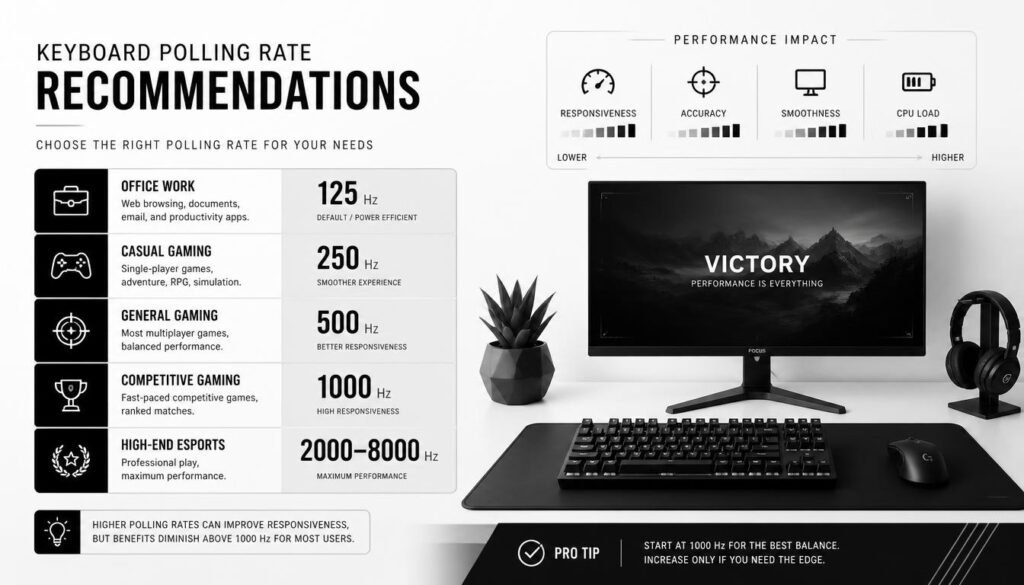
For Office Work
Choose 125Hz to 500Hz. You do not need an extreme polling rate for email, documents, spreadsheets, browsing, or normal computer work.
For General Gaming
Choose 1000Hz. It is a strong all-around option for most games.
For Competitive Gaming
Start with 1000Hz. If your keyboard supports a higher rate and your complete setup is optimized for low latency, you can test 2000Hz, 4000Hz, or 8000Hz.
For High-End Enthusiast Setups
4000Hz or 8000Hz may be worth considering when reducing every possible source of input delay is a priority.
The important point is that a high polling rate should complement a good keyboard and system rather than replace them.
Does an 8000Hz Keyboard Use More CPU?
It can. A higher polling rate means the computer may need to process input reports more frequently.
The real-world impact varies by keyboard, firmware, USB implementation, operating system, and computer. Some users may notice little difference, while demanding setups can be more sensitive to additional processing activity.
That is one reason 1000Hz remains attractive: it already provides a low 1 ms polling interval without requiring the highest available polling frequency.
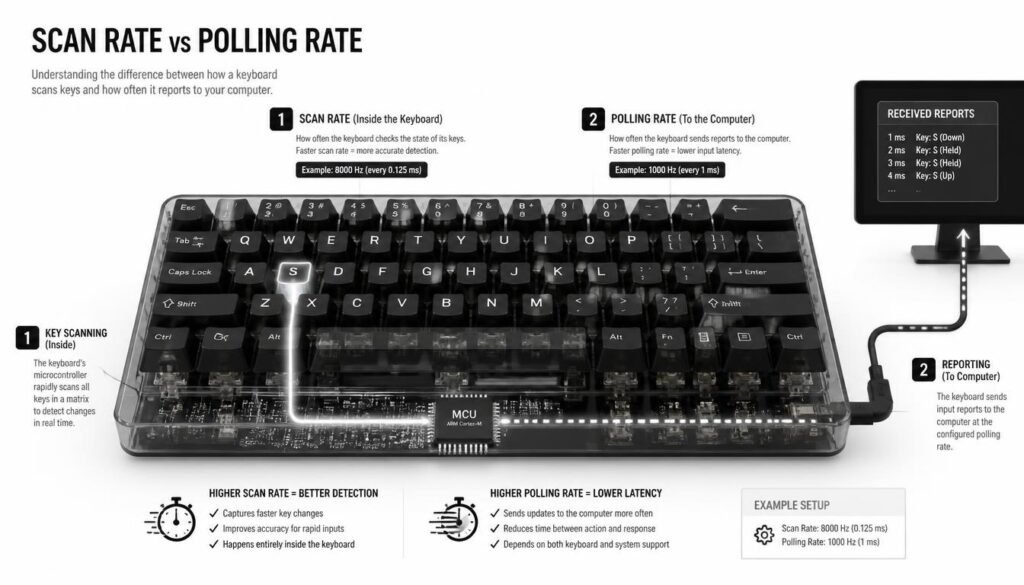
Polling Rate Is Not the Same as Scan Rate
One common mistake is treating polling rate and scan rate as identical.
Polling rate describes how frequently the keyboard reports information to the computer.
Scan rate describes how frequently the keyboard’s internal controller scans its keys.
A keyboard can advertise a high USB polling rate while its internal scanning behavior is different. For that reason, looking at only the advertised polling number can give an incomplete picture of performance.
What Other Keyboard Features Matter for Latency?
Polling rate is only one part of keyboard responsiveness.
When buying a low-latency gaming keyboard, also consider:
Switch Technology
Mechanical, optical, and Hall Effect switches can have different characteristics. The switch determines how and when a key press is detected.
Actuation Settings
Some gaming keyboards let you change how far a key needs to travel before registering. This can matter more to some gamers than simply increasing polling rate.
Firmware
Keyboard firmware controls how the device processes and reports inputs. Well-designed firmware can contribute to consistent performance.
Scan Rate
A high polling rate is most useful when the keyboard can also maintain fresh input information internally.
Connection
Wired and wireless implementations can have different latency characteristics. Some newer wireless gaming keyboards are now designed around high polling rates, but actual performance depends on the specific device.
Common Keyboard Polling Rate Mistakes
One of the biggest mistakes is assuming that higher Hz always means a dramatically better keyboard.
Another mistake is buying an 8000Hz keyboard while ignoring switch quality, actuation behavior, scan rate, firmware, or monitor performance.
It is also easy to confuse polling rate with response time. A 1000Hz polling rate corresponds to a 1 ms theoretical polling interval, but that does not mean the complete keyboard input latency is exactly 1 ms.
Finally, changing polling rate will not fix unrelated performance issues such as network latency, poor frame rates, monitor response problems, or inconsistent software behavior.
How Can You Check Your Keyboard Polling Rate?
You can check your keyboard’s advertised polling rate through the manufacturer’s software or specifications. Some online polling-rate testers can also estimate the rate from keyboard events.
Browser-based tests have limitations, however. Browser timing, operating-system scheduling, and event handling can affect the results, so an online test should be treated as an estimate rather than a laboratory measurement of the keyboard’s USB behavior.
For the most reliable information, check the keyboard manufacturer’s specifications and software settings first.
Frequently Asked Questions About the Best Polling Rate for Keyboard
What is the best polling rate for keyboard gaming?
1000Hz is the best overall polling rate for most gaming keyboards. It provides a 1 ms theoretical polling interval and is fast enough for the majority of gaming setups.
Is 8000Hz better than 1000Hz on a keyboard?
Technically, 8000Hz provides a shorter polling interval: 0.125 ms compared with 1 ms at 1000Hz. The practical improvement is much smaller than the headline numbers suggest, so 8000Hz is mainly useful for high-end setups focused on minimizing latency.
Is 1000Hz enough for competitive gaming?
Yes. 1000Hz is enough for most competitive players. Higher polling rates can be tested on compatible hardware, but they are not a requirement for competitive gaming.
What is the difference between 1000Hz and 8000Hz keyboards?
A 1000Hz keyboard has a theoretical 1 ms polling interval, while an 8000Hz keyboard has a 0.125 ms interval. The difference is 0.875 ms at the polling level.
Does higher keyboard polling rate reduce input lag?
It can reduce the portion of input latency associated with polling. However, overall latency also depends on switch actuation, scan rate, firmware, USB communication, the operating system, game processing, frame timing, and display latency.
Is 500Hz good for a gaming keyboard?
Yes. 500Hz is perfectly usable for gaming, especially for casual players. However, 1000Hz provides a lower theoretical polling interval and is a better general choice when both settings are available.
Does 8000Hz keyboard polling improve FPS?
No. Polling rate does not directly increase FPS. It controls how frequently keyboard input is reported. Graphics performance and FPS depend primarily on the game’s rendering workload and your computer hardware.
Should I use 1000Hz or 8000Hz?
Use 1000Hz for the best balance of performance and simplicity. Consider 8000Hz when you have compatible high-end hardware and specifically want to minimize polling-related latency.
Conclusion
The best polling rate for keyboard use is 1000Hz for most people. It offers a 1 ms theoretical polling interval and provides an excellent balance for gaming, typing, and everyday computing.
Higher polling rates such as 2000Hz, 4000Hz, and 8000Hz can reduce the theoretical polling interval further, but the difference becomes increasingly small. If you are building a serious low-latency gaming setup, 8000Hz can be an interesting high-end option. For everyone else, a reliable 1000Hz keyboard with good switches, firmware, and consistent input performance is usually the smarter choice.