
What is mouse polling rate? Mouse polling rate is the number of times per second your mouse reports its position and movement to your computer. It is measured in hertz (Hz), so a 1,000 Hz polling rate means the mouse sends data to the computer up to 1,000 times per second.
A higher polling rate can reduce the time between mouse reports and make cursor movement feel smoother, especially in fast-paced games. However, a higher number does not automatically mean a better mouse for everyone.
This guide explains how mouse polling rate works, what different polling rates mean, how it affects gaming and everyday use, and which polling rate makes sense for different users.
Table of Contents
What Is Mouse Polling Rate?
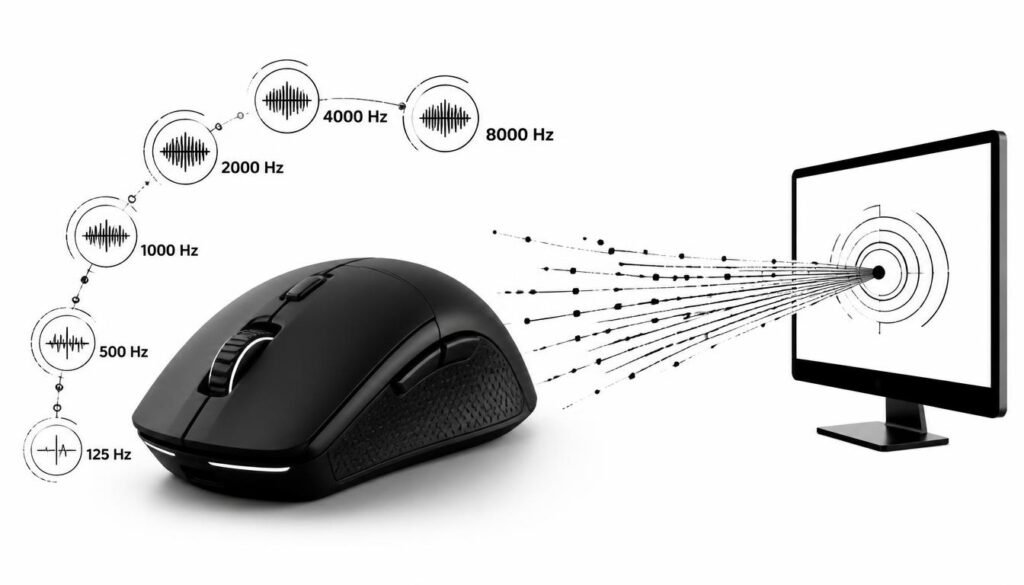
Mouse polling rate is the frequency at which a mouse communicates movement and input data to a computer.
The polling rate is measured in Hz:
| Polling Rate | Reports Per Second | Approx. Time Between Reports |
|---|---|---|
| 125 Hz | 125 | 8 ms |
| 250 Hz | 250 | 4 ms |
| 500 Hz | 500 | 2 ms |
| 1,000 Hz | 1,000 | 1 ms |
| 2,000 Hz | 2,000 | 0.5 ms |
| 4,000 Hz | 4,000 | 0.25 ms |
| 8,000 Hz | 8,000 | 0.125 ms |
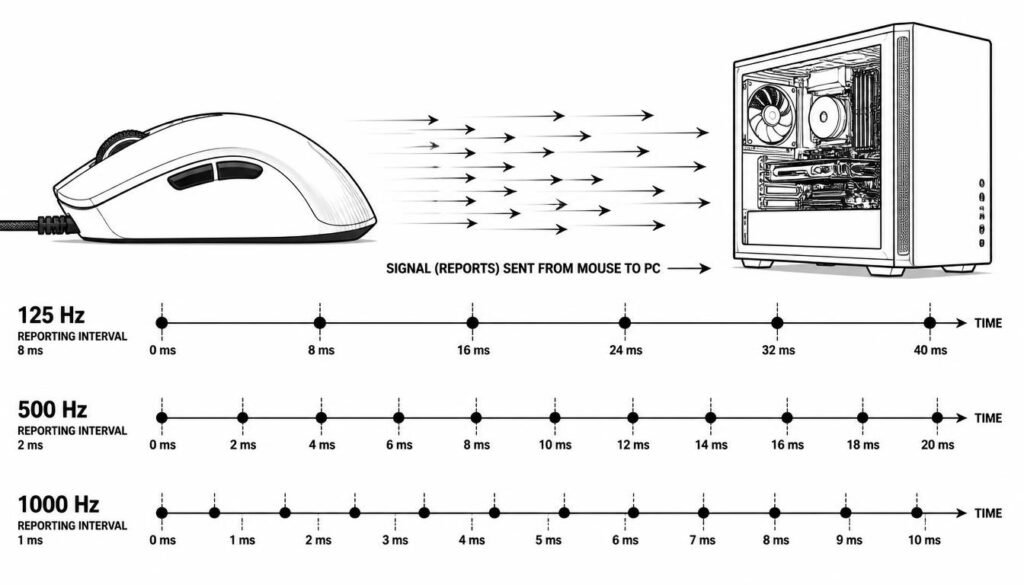
For example, a 500 Hz mouse reports its status about every 2 milliseconds, while a 1,000 Hz mouse reports about every 1 millisecond.
That difference is small, but competitive players may notice improvements in smoothness and responsiveness when other parts of the system are fast enough to take advantage of it.
How Does Mouse Polling Rate Work?
A mouse continually tracks movement, button presses, and other input. It then sends that information to the computer at a set frequency.
At 125 Hz, the mouse can send up to 125 reports each second. At 1,000 Hz, it can send up to 1,000 reports per second.
Think of it like taking snapshots of mouse movement:
- A lower polling rate takes snapshots less often.
- A higher polling rate takes snapshots more frequently.
- More frequent reports can reduce the waiting time between mouse updates.
Polling rate is only one part of the input system. Your mouse sensor, connection type, operating system, game engine, display refresh rate, and other hardware can also influence how responsive mouse movement feels.
What Does 1000 Hz Mean on a Mouse?
A 1,000 Hz mouse polling rate means the mouse can send up to 1,000 reports per second, with a theoretical interval of about 1 millisecond between reports.
1,000 Hz has become a common polling rate because it offers a good balance between responsiveness and system overhead.
For general desktop use, the difference between 500 Hz and 1,000 Hz may be difficult to notice. In competitive games, however, some players prefer 1,000 Hz because it can provide more frequent input updates.
Does a Higher Mouse Polling Rate Reduce Input Lag?
Yes, a higher polling rate can reduce the delay caused by the mouse waiting to send its next report.
For example:
- 125 Hz = up to about 8 ms between reports
- 500 Hz = up to about 2 ms
- 1,000 Hz = up to about 1 ms
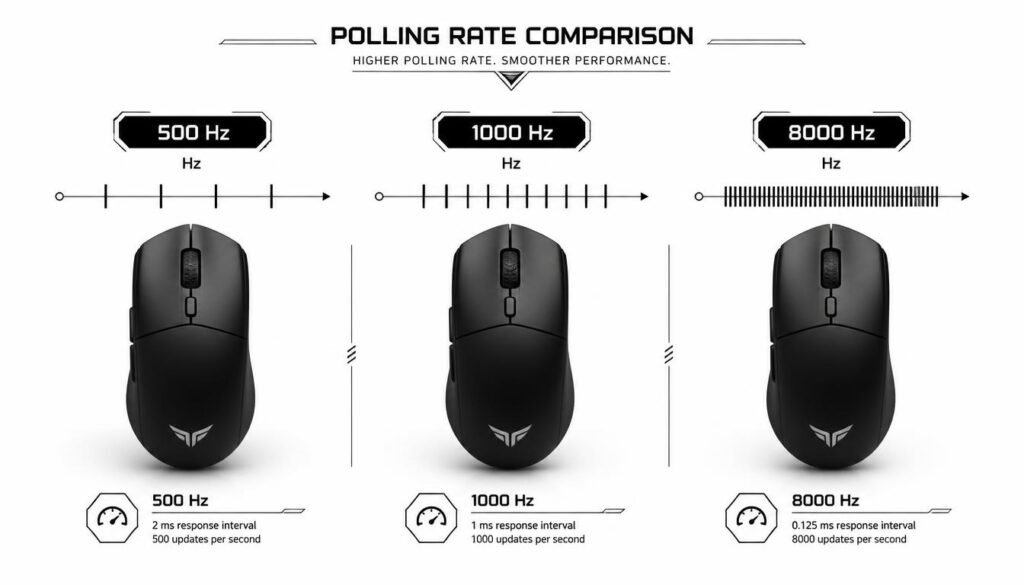
- 8,000 Hz = up to about 0.125 ms
These figures describe the polling interval, not total system input latency.
Your actual click-to-display latency depends on the entire chain, including the mouse, USB or wireless connection, operating system, game, CPU/GPU processing, and monitor.
So switching from 1,000 Hz to 8,000 Hz does not mean your overall input lag automatically becomes eight times lower.
What Is the Difference Between 500 Hz and 1000 Hz?
The main difference between 500 Hz and 1,000 Hz is how often the mouse sends reports.
A 500 Hz mouse reports every 2 milliseconds, while a 1,000 Hz mouse reports every 1 millisecond.
For basic tasks such as browsing, writing, or working in spreadsheets, the difference is usually minor. For fast competitive gaming, 1,000 Hz can provide more frequent input updates.
The practical improvement will depend on your hardware and whether your game and system can process the additional reports efficiently.
What Is the Difference Between 1000 Hz and 2000 Hz?
A 2,000 Hz polling rate reports input twice as often as 1,000 Hz.
The polling interval changes from roughly 1 millisecond at 1,000 Hz to about 0.5 milliseconds at 2,000 Hz.
This can improve the timing of mouse updates, but the improvement is smaller than simply looking at the numbers might suggest. Other sources of latency can be much larger than the difference between these polling rates.
What Is 4000 Hz Mouse Polling Rate?
A 4,000 Hz polling rate means the mouse can report its input up to 4,000 times per second.
The theoretical interval between reports is about 0.25 milliseconds.
High polling rates such as 4,000 Hz are mainly aimed at users who care about extremely responsive input, including competitive gamers and enthusiasts using high-refresh-rate systems.
However, these mice can place more processing demand on the computer because the system has to handle more frequent input reports.
What Is 8000 Hz Mouse Polling Rate?
An 8,000 Hz polling rate allows a mouse to send up to 8,000 reports per second, or approximately one report every 0.125 milliseconds.
This is a very high polling rate and is designed primarily for performance-focused users.
The benefit becomes more relevant when the rest of the setup is capable of displaying and processing very fast input updates. If you are using a basic office monitor and performing normal desktop tasks, the practical difference may be negligible.
Does Polling Rate Affect Gaming?
In competitive first-person shooters, for example, small timing differences can matter because players make rapid flicks, tracking movements, and precise aim adjustments.
A higher polling rate can provide more frequent movement updates, which may result in smoother cursor or camera movement.
Still, polling rate is not a magic performance setting. A good mouse with an accurate sensor at 1,000 Hz can be a better choice than a poorly designed mouse advertised with a much higher polling rate.
Does a Higher Polling Rate Improve Aim?
Not directly.
A higher polling rate does not make your sensor inherently more accurate or make you a better aimer. It simply allows the mouse to report movement more frequently.
Aim performance also depends on factors such as:
- Mouse sensor quality
- DPI or CPI setting
- In-game sensitivity
- Mouse grip
- Surface quality
- Game settings
- Frame rate
- Monitor refresh rate
- Personal skill and consistency
If your aim feels inconsistent, increasing polling rate may not solve the real problem.
Is 1000 Hz Enough for Gaming?
For most gamers, 1,000 Hz is still a strong and practical polling rate.
It offers a low polling interval without requiring the same level of system resources associated with very high polling rates.
For many competitive gaming setups, 1,000 Hz provides an excellent balance of responsiveness, compatibility, and performance.
Higher rates such as 2,000 Hz, 4,000 Hz, and 8,000 Hz can be useful for enthusiasts, but their benefits become increasingly dependent on the rest of the system.
What Polling Rate Should You Use?
The best mouse polling rate depends on what you do with your computer.
For Everyday Computer Use
125 Hz to 500 Hz is generally more than adequate for browsing, office work, schoolwork, and similar tasks.
You are unlikely to gain a meaningful productivity benefit from moving to an extremely high polling rate.
For Casual Gaming
500 Hz to 1,000 Hz is a sensible range for most casual gamers.
You get responsive tracking without needing an unusually high polling frequency.
For Competitive Gaming
1,000 Hz or higher can make sense for players who prioritize low-latency input.
Players with high-refresh-rate monitors and powerful gaming PCs may consider 2,000 Hz, 4,000 Hz, or 8,000 Hz mice.
For High-Refresh-Rate Setups
Very high polling rates are most interesting when paired with a system designed for low latency.
If you have a fast monitor, high frame rates, and a performance-focused setup, a higher polling rate may provide a smoother and more responsive experience.
Does a Higher Polling Rate Use More CPU?
The actual impact depends on the mouse, software, operating system, and computer hardware.
For example, moving from 1,000 Hz to 8,000 Hz means the system may need to handle many more reports per second. On some systems, this can have a measurable performance impact, especially during demanding workloads or games.
That is one reason higher polling rates should be viewed as a performance option rather than a setting that is always better.
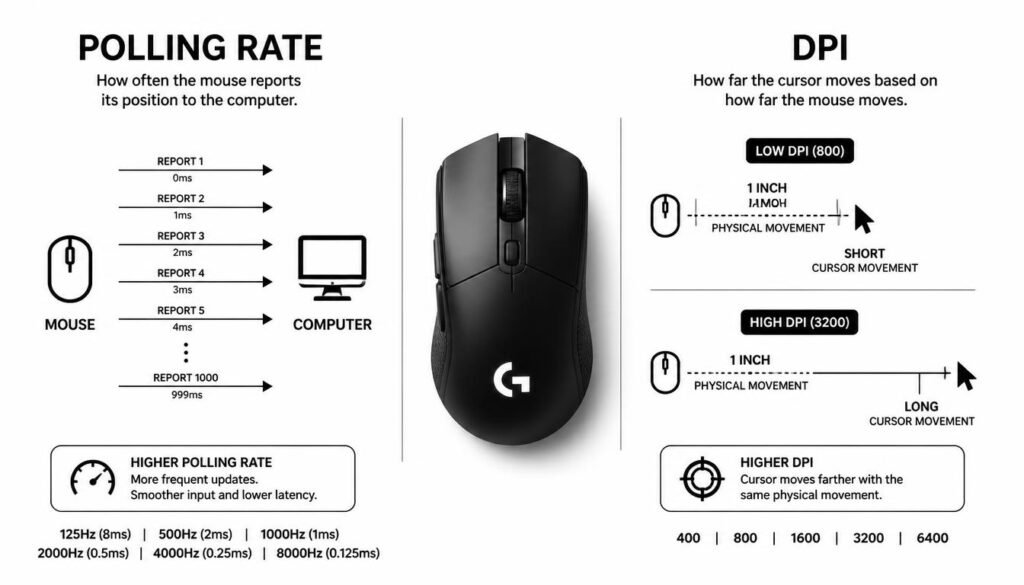
Polling Rate vs DPI: What Is the Difference?
Polling rate and DPI control completely different aspects of mouse behavior.
DPI (dots per inch), often referred to as CPI by some manufacturers, describes how much cursor movement the mouse produces in response to physical movement.
Polling rate describes how frequently the mouse sends input data to the computer.
For example, a mouse can run at 800 DPI and 1,000 Hz at the same time.
Changing DPI affects sensitivity. Changing polling rate affects how frequently movement information is reported.
Simple Example
Imagine moving your mouse across your desk:
- DPI determines how far the cursor moves.
- Polling rate determines how frequently the computer receives updates about that movement.
They work together, but they are not the same thing.
Polling Rate vs Mouse Sensor: Which Matters More?
A high polling rate cannot compensate for a poor sensor.
The mouse sensor determines how accurately physical movement is detected. Polling rate determines how often that detected movement is communicated to the computer.
For a good gaming mouse, sensor performance, tracking consistency, latency, shape, weight, and polling rate all matter.
In many cases, choosing a well-designed mouse with a reliable sensor is more important than buying a mouse solely because it advertises the highest polling rate.
Does Wireless Mouse Polling Rate Matter?
Yes. Wireless mice can also use different polling rates.
Modern wireless gaming mice can support high polling rates, although the exact capabilities depend on the mouse and its wireless technology.
Wireless performance should not be judged by polling rate alone. Connection stability, battery life, wireless latency, interference, and receiver design also matter.
A well-designed wireless gaming mouse can provide highly responsive input without requiring a cable.
How Can You Check Your Mouse Polling Rate?
The easiest method is usually to check the mouse manufacturer’s software.
Many gaming mice provide a setting where you can choose options such as:
- 125 Hz
- 250 Hz
- 500 Hz
- 1,000 Hz
- 2,000 Hz
- 4,000 Hz
- 8,000 Hz
You can also use an online mouse polling rate tester to estimate how frequently your mouse reports movement.
Keep in mind that software-based testers can vary in how they measure polling behavior, so they should be treated as practical testing tools rather than laboratory-grade measurement systems.
How to Change Mouse Polling Rate
If your mouse supports multiple polling rates, changing the setting is usually straightforward.
Step 1: Open Your Mouse Software
Launch the software provided by your mouse manufacturer.
Step 2: Find the Polling Rate Setting
Look for a setting labeled Polling Rate, Report Rate, or something similar.
Step 3: Select Your Preferred Rate
Choose a value such as 500 Hz or 1,000 Hz. Higher-end gaming mice may offer 2,000 Hz, 4,000 Hz, or 8,000 Hz.
Step 4: Test Your Mouse
Move the mouse around and use it in the applications or games where you normally use it.
If a higher polling rate causes performance issues, unusual behavior, or increased CPU usage, try lowering it.
Common Mouse Polling Rate Mistakes
One common mistake is assuming that the highest polling rate is automatically the best.
A second mistake is confusing polling rate with DPI. Increasing DPI does not increase the number of times the mouse reports to the computer.
Another mistake is focusing on polling rate while ignoring more important factors such as sensor quality, latency, shape, weight, software, and personal comfort.
The best setup is the one that performs reliably and feels comfortable for your specific use.
Does Monitor Refresh Rate Matter for Mouse Polling Rate?
Monitor refresh rate and mouse polling rate are different, but they can work together.
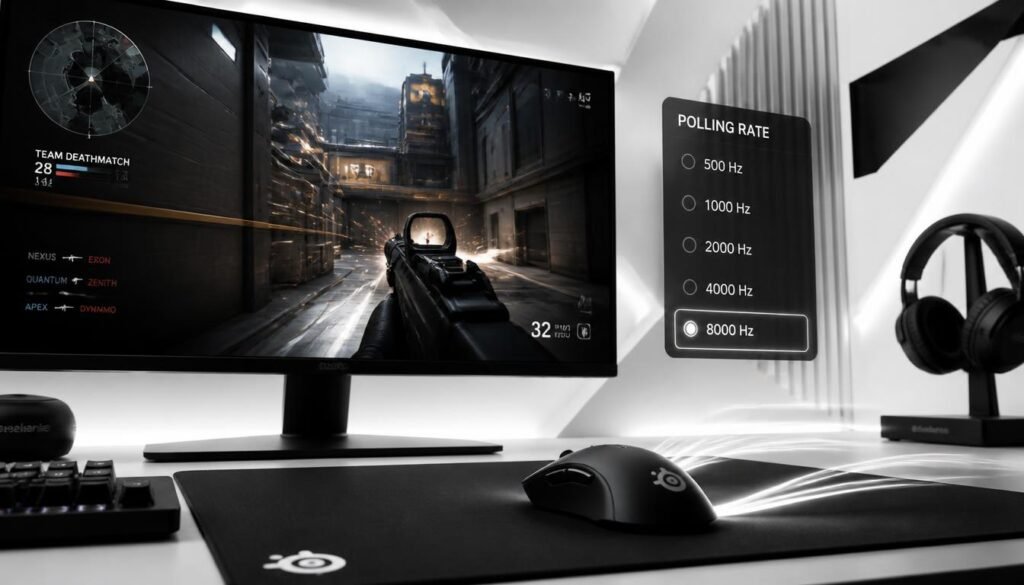
A higher-refresh-rate display updates the visible image more frequently. A higher mouse polling rate allows the computer to receive mouse input more frequently.
For example, a 60 Hz monitor and an 8,000 Hz mouse can still receive frequent mouse reports, but the monitor cannot display a new frame thousands of times per second.
That does not make a high polling rate useless, but it means the overall benefit is influenced by the rest of the system.
Is 8000 Hz Better Than 1000 Hz?
The theoretical polling interval is much lower at 8,000 Hz, but the real-world improvement depends on your monitor, frame rate, CPU performance, game, mouse implementation, and sensitivity to latency.
For most people, 1,000 Hz remains a practical choice. Higher polling rates are better viewed as an enthusiast or competitive feature rather than a requirement.
Frequently Asked Questions About Mouse Polling Rate
What is mouse polling rate in simple terms?
Mouse polling rate is how often your mouse sends movement and button information to your computer. A 1,000 Hz mouse can report up to 1,000 times each second.
Is 125 Hz bad for a mouse?
No. A 125 Hz polling rate can work perfectly well for basic computer tasks. It simply provides less frequent updates than higher polling rates.
Is 500 Hz good for gaming?
Yes. 500 Hz can be suitable for gaming, especially for casual and general-purpose use. Competitive players may prefer 1,000 Hz or higher.
Is 1000 Hz enough for a gaming mouse?
Yes. 1,000 Hz is a widely used polling rate and offers a good balance of responsiveness and system overhead for many gamers.
Does 8000 Hz make a mouse more accurate?
No. Polling rate determines how frequently movement data is reported; it does not automatically improve the accuracy of the mouse sensor.
Does polling rate affect FPS?
A higher polling rate can increase CPU processing overhead because the computer receives more reports. The performance impact varies by system and software.
Is polling rate the same as DPI?
No. DPI controls how much cursor movement is produced by physical mouse movement, while polling rate controls how frequently the mouse reports its input.
What is the best mouse polling rate?
For many users, 1,000 Hz is a practical choice. Casual users can be comfortable with lower rates, while competitive gamers and enthusiasts may benefit from higher rates depending on their hardware.
Conclusion: What Is Mouse Polling Rate?
So, what is mouse polling rate? It is the number of times a mouse reports its movement and input data to a computer each second, measured in hertz.
A higher polling rate can reduce the time between mouse reports and may provide smoother, more responsive input. However, the highest polling rate is not automatically the best choice. Sensor quality, DPI, latency, monitor refresh rate, frame rate, hardware performance, and personal preference all affect the final experience.
For most users, 500 Hz or 1,000 Hz is more than enough. Competitive gamers with high-performance systems may choose 2,000 Hz, 4,000 Hz, or 8,000 Hz when minimizing input latency is a priority.
The key is to choose a polling rate that fits your system and your actual needs rather than simply choosing the biggest number.