
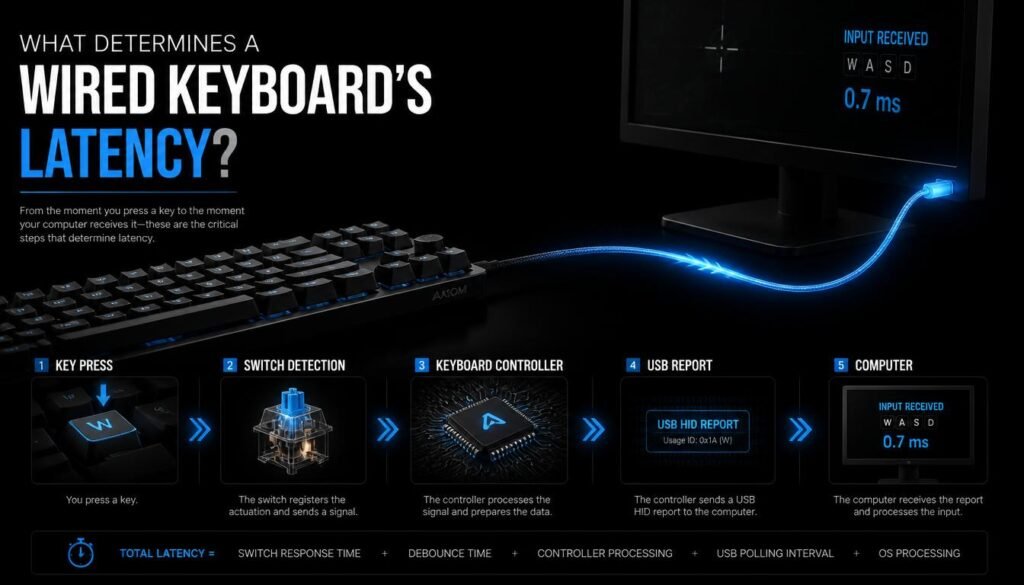
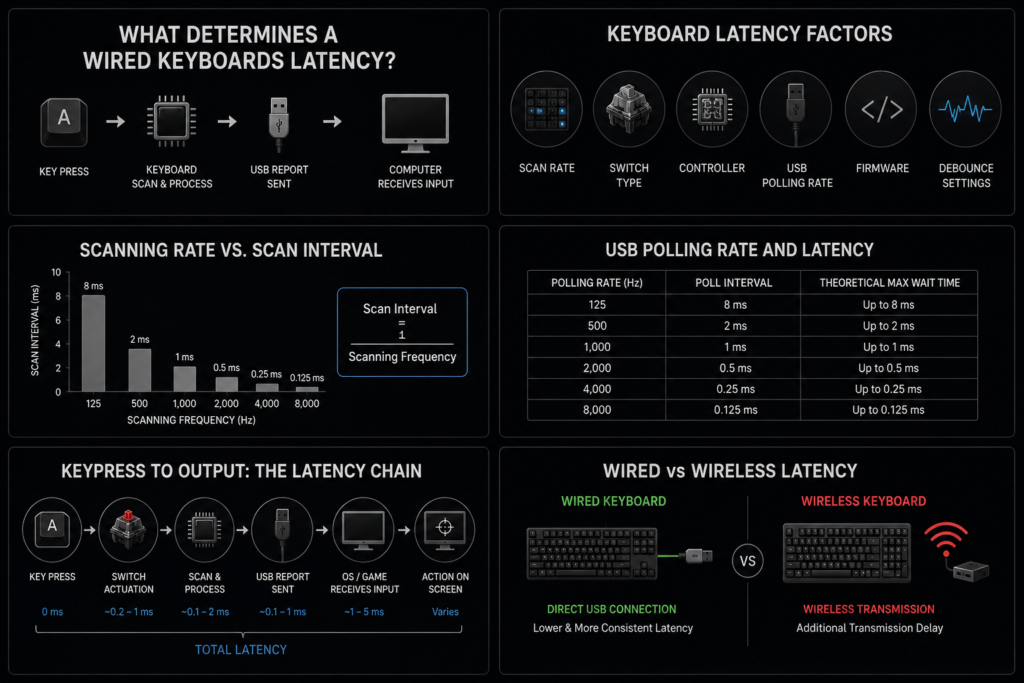
What determines a wired keyboards latency? The main factors are the keyboard’s switch type, scanning rate, USB connection, controller, firmware, debounce settings, and the time it takes to send a keypress to the computer. A wired connection usually removes wireless transmission delay, but the keyboard itself can still have measurable latency.
If you are trying to understand why one wired keyboard feels more responsive than another, the answer is not simply “USB is faster.” The entire input process matters, from the moment you press a key to the moment your computer receives and processes that input.
Table of Contents
What Determines a Wired Keyboard’s Latency?
A wired keyboard’s latency is mainly determined by how quickly its hardware detects a keypress, scans the key matrix, processes the input, and reports it to the computer.
The most important factors include:
- Keyboard scanning rate
- Switch and actuation behavior
- Keyboard controller
- USB polling/reporting behavior
- Firmware processing
- Debounce settings
- Connection and USB implementation
- Computer and software processing after the keyboard sends the signal
These factors work together, so a keyboard with a USB cable is not automatically low-latency.
How Does Keyboard Scanning Rate Affect Latency?
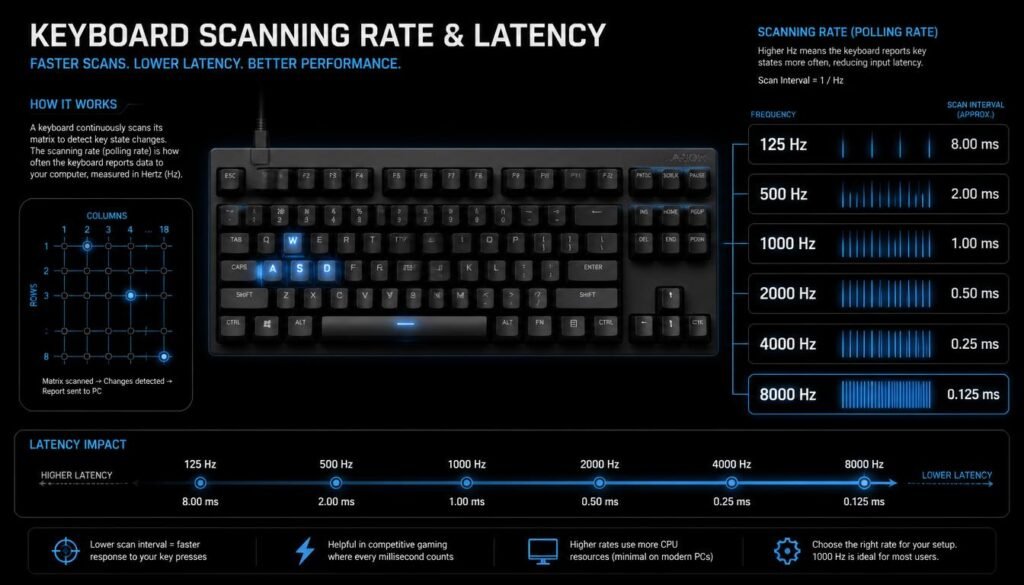
The scanning rate determines how frequently a keyboard checks its keys for changes. A faster scanning rate gives the keyboard more opportunities to detect a keypress quickly.
For example, imagine a keyboard scans its keys once every 4 milliseconds. If you press a key just after a scan has happened, the keyboard may need to wait nearly another 4 milliseconds before detecting it.
A faster scan interval reduces this waiting period.
Scanning Rate vs. Scan Interval
The relationship is simple:
Scan interval = 1 ÷ scanning frequency
For example:
| Scanning frequency | Scan interval |
|---|---|
| 125 Hz | 8 ms |
| 500 Hz | 2 ms |
| 1,000 Hz | 1 ms |
| 2,000 Hz | 0.5 ms |
| 4,000 Hz | 0.25 ms |
| 8,000 Hz | 0.125 ms |
These numbers describe the theoretical interval between scans. Actual end-to-end keyboard latency can be higher because other parts of the keyboard and computer also take time.
Do Keyboard Switches Affect Latency?
Yes. The type of switch and how it detects actuation can affect when the keyboard registers a keypress.
Mechanical, optical, Hall effect, and other switch technologies can use different sensing and signal-processing methods. However, the switch technology alone does not tell you the complete latency of a keyboard.
For example, two keyboards could both use mechanical switches but have different controllers, scanning rates, firmware, and debounce behavior. Their measured latency could therefore be different.
Actuation Point Matters, Too
A key has to reach its actuation point before the keyboard registers it.
A shorter actuation distance can allow an input to register earlier during the physical key travel, but it does not automatically mean the keyboard has lower total electronic latency.
This distinction is useful:
- Actuation point: when the switch registers your physical movement
- Keyboard latency: the time from registration to the computer receiving the input
- System latency: the additional delay before the application or game reacts
All three are related, but they are not the same thing.
What Role Does the Keyboard Controller Play?
The keyboard controller is one of the most important components affecting latency.
It scans the key matrix, detects changes, processes the input, and communicates with the computer. A controller designed for fast scanning and efficient reporting can reduce the time between a physical keypress and the USB report.
A keyboard with high-performance switches can still feel slower if its controller or firmware processes inputs inefficiently.
This is why looking only at the switch specification is not enough when comparing wired keyboards.
Does USB Polling Rate Affect Wired Keyboard Latency?
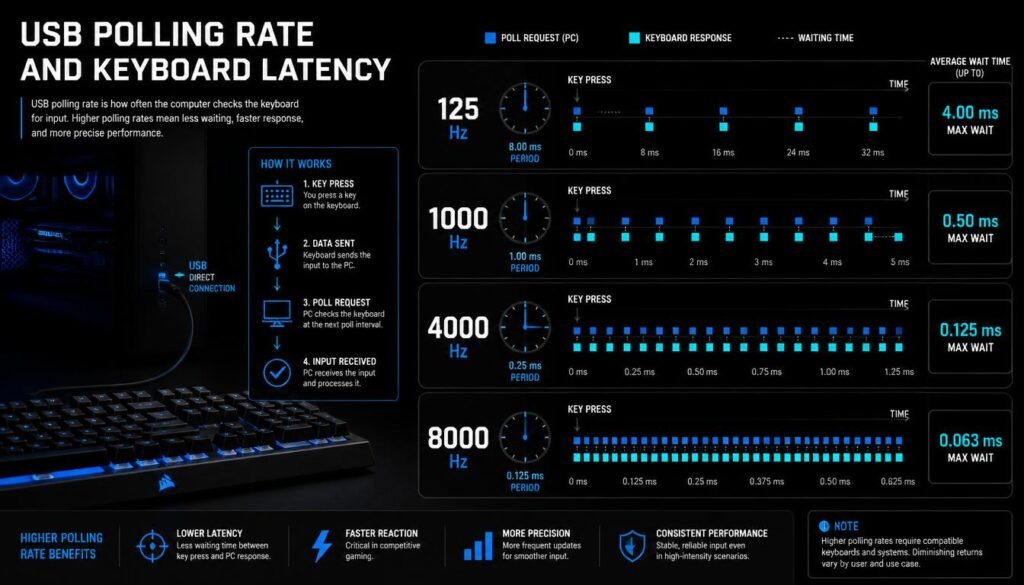
Yes, although USB polling is only one part of the latency chain.
The USB polling rate describes how frequently the host communicates with a USB device or checks for reports, depending on the USB implementation.
Common advertised keyboard polling rates include 125 Hz, 500 Hz, 1,000 Hz, 2,000 Hz, 4,000 Hz, and 8,000 Hz.
A higher polling rate can reduce the theoretical waiting time associated with host reporting.
For example:
- 125 Hz ≈ 8 ms interval
- 1,000 Hz ≈ 1 ms interval
- 8,000 Hz ≈ 0.125 ms interval
But a higher polling rate does not guarantee that the entire keyboard has proportionally lower latency. The keyboard still needs to detect the keypress and prepare the report before the computer can receive it.
Does a USB Cable Make a Keyboard Low Latency?
Not by itself.
A wired connection generally avoids the extra wireless transmission process used by Bluetooth or 2.4 GHz wireless keyboards, but the cable is only the communication path.
Two keyboards can both use USB and still have noticeably different latency because of differences in:
- Scanning frequency
- Controller hardware
- Firmware
- Switch sensing
- Debounce behavior
- USB implementation
- Internal processing
So the better question is not “Is the keyboard wired?” but “How quickly does the keyboard detect, process, and report a keypress?”
How Does Debounce Affect Keyboard Latency?
Debouncing is the process used to prevent unwanted multiple registrations from a switch signal.
Mechanical switches can produce rapid electrical fluctuations when they make contact. Without suitable debounce handling, one physical keypress could potentially be interpreted as several presses.
A keyboard may therefore wait for a stable signal before confirming the input.
This can add some latency.
Mechanical vs. Optical and Hall Effect Keyboards
Traditional mechanical switches often need some form of debounce filtering. Optical and Hall effect keyboards detect key movement differently and may use different signal-processing approaches.
However, it is a mistake to assume that every optical or Hall effect keyboard automatically has lower latency than every mechanical keyboard. The implementation still matters.
Can Firmware Change Keyboard Latency?
Yes. Firmware controls much of the keyboard’s behavior after a keypress is detected.
Firmware can affect:
- How often the keys are scanned
- How input is filtered
- Debounce timing
- How quickly reports are created
- USB reporting behavior
- Features such as rapid-trigger or adjustable actuation
Two keyboards with similar hardware can therefore have different latency because their firmware is designed differently.
Firmware updates can also change performance, although users should check the manufacturer’s documentation before assuming an update will reduce latency.
What Is the Difference Between Keyboard Latency and Input Lag?
These terms are related but not interchangeable.
Keyboard latency is the delay introduced by the keyboard and its communication with the computer.
Input lag is a broader term that can include delays throughout the entire input chain.
For example:
Key press → switch detection → keyboard scanning → firmware → USB report → operating system → application/game → display response
The keyboard only controls part of this chain.
This is especially important for gaming. A keyboard can have very low measured latency, while the total time before an action appears on screen is still affected by game processing, CPU/GPU workload, frame timing, display behavior, and other system factors.
What Keyboard Features Usually Matter Most for Latency?
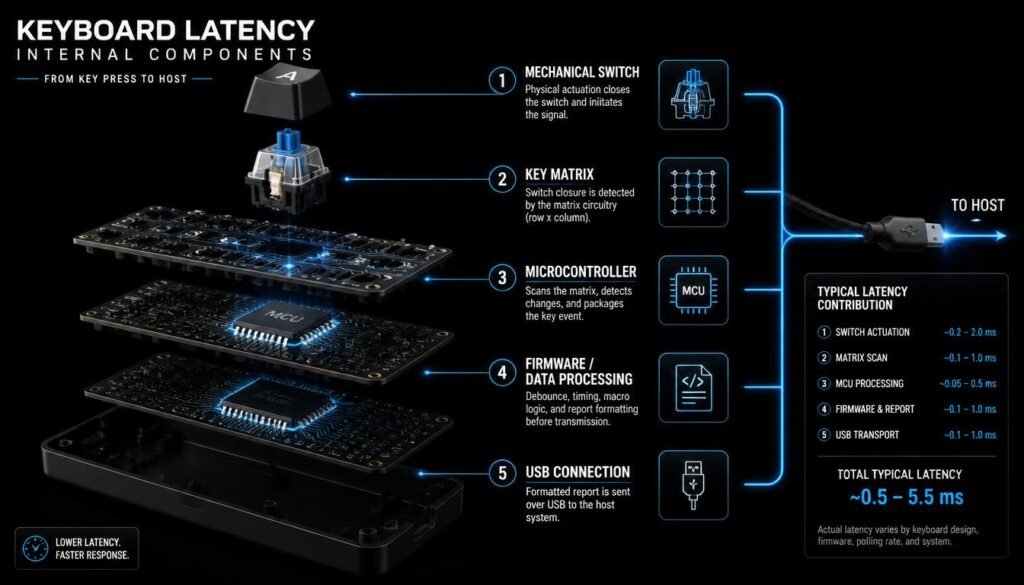
When comparing wired keyboards, focus on the complete implementation rather than a single specification.
1. Scan Rate
A faster scan rate can reduce the time the keyboard waits to detect a change.
2. Polling or Report Rate
A higher report rate can reduce the theoretical waiting interval between reports.
3. Controller Performance
The microcontroller needs to scan, process, and send inputs efficiently.
4. Switch Technology
The sensing method can influence how quickly a keypress is recognized.
5. Debounce and Signal Processing
Aggressive debounce settings can add delay, while insufficient filtering can cause false or repeated inputs.
6. Firmware
Firmware determines how the hardware handles and reports the input.
7. Internal Design
The keyboard’s matrix design, USB implementation, and electrical architecture can all contribute to its total latency.
Does a Higher Polling Rate Always Mean Lower Keyboard Latency?
No.
A higher polling rate can reduce one part of the possible waiting time, but it does not eliminate delays elsewhere.
Imagine two wired keyboards:
Keyboard A
- 8,000 Hz polling
- Slow scanning
- Conservative debounce
- Less efficient firmware
Keyboard B
- 1,000 Hz polling
- Fast scanning
- Efficient controller
- Well-tuned firmware
Keyboard B could potentially have lower measured end-to-end latency despite its lower advertised polling rate.
This is why measured latency is more useful than looking at polling rate alone.
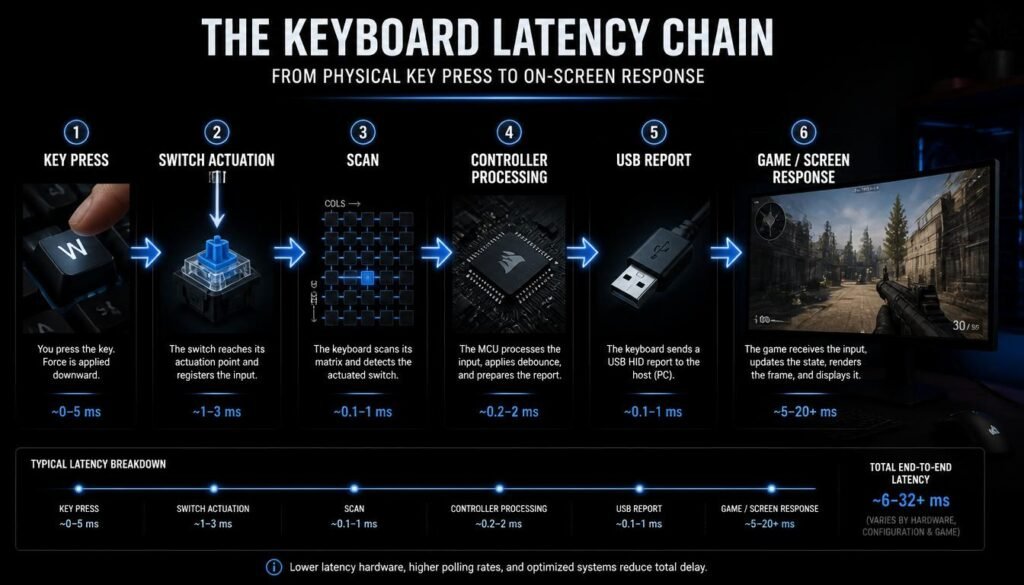
What Determines a Keyboard’s Total Latency?
A useful way to think about keyboard latency is as a chain of smaller delays:
Total keyboard latency ≈ detection delay + processing delay + reporting delay
The exact components vary by keyboard design, but the principle is straightforward.
Detection Delay
This is the time between your physical keypress and the keyboard recognizing the change.
Processing Delay
The controller and firmware may need to filter, scan, and process the input.
Reporting Delay
The keyboard then sends the input report to the computer.
The computer introduces additional latency after that, but that is outside the keyboard’s own latency.
How Can You Reduce Wired Keyboard Latency?
You cannot eliminate every source of delay, but you can make sure your setup is not adding unnecessary latency.
Use a Direct USB Connection
Connect the keyboard directly to the computer when practical rather than relying on unnecessary adapters or hubs.
Enable the Keyboard’s Performance Settings
Some gaming keyboards include settings for higher polling rates, faster scanning, adjustable actuation, or rapid trigger. Use these according to the manufacturer’s documentation.
Keep Firmware Updated
Manufacturers sometimes release firmware improvements that change performance, compatibility, or input processing.
Check Actual Measurements
Manufacturer specifications can tell you the scanning rate or polling rate, but independent latency measurements can provide a better picture of real-world performance.
Avoid Confusing Actuation With Total Latency
A shorter actuation distance does not automatically mean the keyboard has the lowest electronic latency. Check the complete measurement.
How Is Wired Keyboard Latency Measured?
Keyboard latency can be measured using specialized hardware and software that detects the physical keypress and compares it with the input report received by the computer.
The methodology matters.
A test may measure:
- Physical switch activation to USB signal
- Switch activation to operating-system input
- Average latency
- Minimum or maximum latency
- Scan latency
- Polling-related delay
Because different reviewers use different testing methods, latency numbers are most useful when you understand what the test actually measured.
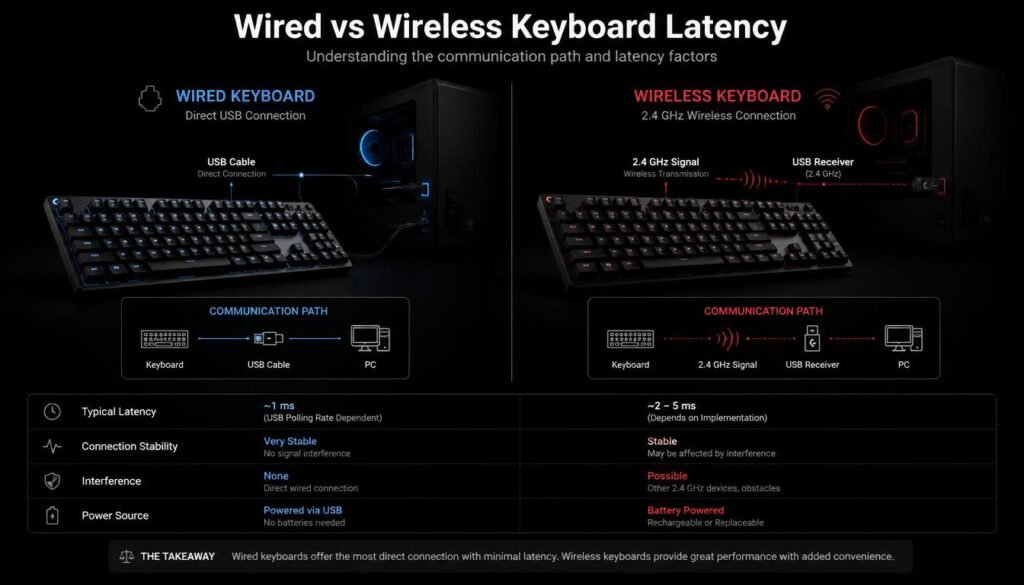
Wired Keyboard Latency vs. Wireless Latency
A wired keyboard generally has a simpler communication path because it sends data through a physical USB connection.
Wireless keyboards must also handle wireless transmission and radio communication. Modern 2.4 GHz gaming keyboards can still achieve very fast performance, but wireless introduces additional considerations that a standard wired connection does not have.
That does not mean every wired keyboard is automatically faster than every wireless keyboard. The keyboard’s internal hardware and implementation still matter.
What Should You Look for When Buying a Low-Latency Wired Keyboard?
If low latency is your priority, do not choose a keyboard based only on its polling rate.
Look for a keyboard with:
- A fast scanning system
- A responsive controller
- Well-tuned firmware
- Low measured input latency
- A suitable switch technology
- A high enough USB report rate for your needs
- Independent testing from reliable reviewers
For competitive gaming, measured end-to-end latency is often more informative than marketing terms such as “instant response” or “ultra-fast.”
Common Misconceptions About Wired Keyboard Latency
“All Wired Keyboards Have Zero Latency”
They do not. Wired keyboards still require time to detect, process, and report a keypress.
“8,000 Hz Means the Keyboard Is Eight Times Faster”
Not necessarily. An 8,000 Hz report interval is much shorter than a 1,000 Hz interval, but total keyboard latency depends on many other stages.
“Mechanical Switches Are Always Slower”
Not necessarily. Switch technology alone does not determine the keyboard’s complete latency.
“Shorter Actuation Means Lower Total Latency”
Not always. Actuation distance concerns when the key registers physically, while total latency includes electronic and reporting delays.
“USB 2.0 Is Too Slow for a Gaming Keyboard”
For keyboard data, the USB connection itself is generally not the limiting factor. The keyboard’s implementation and reporting behavior matter much more than simply seeing a USB version number.
FAQ: What Determines a Wired Keyboard’s Latency?
What determines a wired keyboards latency?
A wired keyboard’s latency is mainly determined by its scanning rate, switch detection method, controller, firmware, debounce settings, and USB reporting behavior. The total delay is the combination of these stages.
Is a 1,000 Hz keyboard fast enough for gaming?
For many users, a 1,000 Hz report rate provides a very short theoretical reporting interval. A keyboard’s overall latency still depends on scanning, firmware, controller performance, and other factors.
Does a higher polling rate reduce keyboard latency?
It can reduce the reporting interval, but it does not automatically make the entire keyboard faster. Total latency depends on the complete input path.
Are wired keyboards faster than wireless keyboards?
A wired connection removes the wireless transmission step, but not every wired keyboard is faster than every wireless keyboard. The hardware and firmware implementation determine a large part of the actual latency.
Do Hall effect keyboards have lower latency?
Hall effect keyboards can be designed for very fast input detection and features such as adjustable actuation and rapid trigger. However, the exact latency depends on the specific keyboard’s hardware, scanning, firmware, and configuration.
Does switch type determine keyboard latency?
Switch type can influence how and when an input is detected, but it is only one part of the latency equation. Controller, scanning, debounce, firmware, and USB reporting also matter.
What is a good polling rate for a low-latency keyboard?
A 1,000 Hz polling rate is a common baseline, while some newer gaming keyboards advertise significantly higher rates. The most useful specification is still the keyboard’s measured end-to-end latency rather than polling rate alone.
How can I check my keyboard’s real latency?
Look for independent latency testing that explains its measurement method. Different testing methods can produce different results, so compare keyboards tested under similar conditions.
Conclusion
What determines a wired keyboards latency? It is the combination of the keyboard’s scanning rate, switch detection, controller, firmware, debounce behavior, and USB reporting—not simply the fact that it uses a cable.
A wired connection provides a direct communication path, but the keyboard still has to detect your keypress, process the signal, and report it to the computer. For the most accurate comparison, focus on measured end-to-end latency and the complete hardware and firmware design rather than relying on a single number such as polling rate.